Cats Font
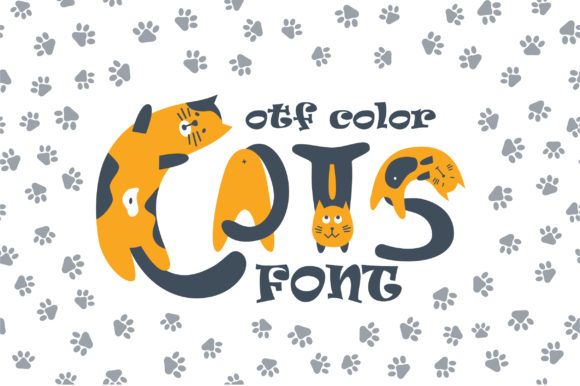
Cats is a color font built on the OpenType-SVG format, designed with a playful, feline-inspired aesthetic. It features bold, rounded letterforms adorned with vibrant, cat-themed glyphs—think whiskers, paw prints, and tiny ears embedded directly into the characters. Unlike standard fonts, Cats renders color and layered detail natively in compatible software, eliminating the need for manual recoloring or vector tracing to achieve its signature charm.
Who Might Consider Cats?
Designers working on projects that benefit from expressive, thematic typography may find Cats relevant—especially those creating social media graphics, children’s book covers, greeting cards, branding for pet-related businesses, or playful packaging. Its visual distinctiveness makes it suitable for short-form text where personality matters more than extended readability: headlines, logos, invitations, and decorative labels.
Key Benefits of Using Cats
- Visual impact without extra design steps: Because it’s an OpenType-SVG font, color and detail are baked into each glyph. In supported applications like Adobe Photoshop and Illustrator, characters appear as intended upon typing—no need to apply swatches or layer effects manually.
- Consistent theme execution: The unified cat motif across the character set helps maintain stylistic cohesion, reducing time spent sourcing or aligning supplementary icons or illustrations.
- Broad software support (within limits): Works reliably in Photoshop CC 2017+, Illustrator CC 2018+, Silhouette Studio Business Edition, and Inkscape 1.1+. These environments recognize and render SVG layers correctly.
Important Limitations and Compatibility Notes
Cats is not universally compatible. Its OpenType-SVG format means it will not function as expected in many common tools. Most notably, Cats does not work in Cricut Design Space—even when installed system-wide. The included OTF and TTF files are fallbacks only; they contain no color data and display as monochrome outlines, lacking the font’s defining visual traits.
This limitation affects users whose primary workflow involves cutting machines, vinyl plotting, or web-based design platforms that don’t support SVG fonts (e.g., Canva, Google Fonts, most HTML/CSS environments). If your output depends on physical cutting or broad web deployment, Cats won’t meet those functional needs.
When Cats Is a Strong Fit
Cats works best in controlled digital design contexts where you retain full control over the environment and output medium. For example:
- A graphic designer preparing a print-ready birthday invitation in Illustrator, where color fidelity and thematic consistency are priorities.
- A small business owner creating Instagram story templates in Photoshop, using Cats for attention-grabbing headers that reflect their brand’s lighthearted tone.
- An illustrator integrating typographic elements directly into vector artwork in Inkscape, leveraging the font’s built-in details to avoid redundant asset management.
In these cases, the font streamlines production by embedding visual complexity at the type level—reducing reliance on external assets and minimizing manual styling.
When to Look Elsewhere
Consider alternatives if your project requires:
- Cutting machine compatibility: Since Cats lacks Cricut support—and its fallback OTF/TTF files are non-functional for intended use—fonts designed specifically for craft software (e.g., those distributed as TrueType with simplified outlines) would be more practical.
- Long-form text: Its decorative nature and tight spacing make Cats unsuitable for paragraphs, body copy, or interfaces requiring sustained reading. Legibility declines quickly beyond headline use.
- Web or app integration: OpenType-SVG fonts have limited browser support (only recent versions of Safari and Chrome partially support them via
@font-face, with inconsistent rendering). For web projects, CSS-based solutions or SVG text elements offer more predictable results. - Brand scalability: While charming at small scale, the fine details in Cats (e.g., tiny paw prints inside letters) may blur or disappear when scaled down significantly—making it less versatile for responsive layouts or multi-size branding systems.
Practical Decision-Making Guidance
Before choosing Cats, ask yourself three questions:
- What software am I using—and does it fully support OpenType-SVG? Verify version numbers against official documentation. If you’re unsure, test with a free sample before purchasing.
- What is the primary output format? If final delivery is print or static digital images (PDF, PNG, JPG), Cats poses few constraints. If output includes cut files, web fonts, or editable templates for others using different tools, compatibility gaps may introduce delays or rework.
- Does the project’s tone and scope match the font’s strengths? A playful, concise application benefits most. A formal report, accessibility-focused interface, or multilingual layout likely does not.
Also review the vendor’s Ultimate Font Guide—not just for installation steps, but to understand how color fonts behave differently in editing versus export workflows. Some applications rasterize SVG glyphs on export, which may affect file size or editability later.
Final Considerations
Cats represents a specific niche within typography: expressive, theme-driven, and technically specialized. Its value lies in its ability to deliver consistent visual storytelling through type alone—but only when matched with compatible tools and appropriate use cases. It is not a general-purpose replacement for system fonts or widely deployable web type. Instead, it functions best as a targeted creative tool: one that solves particular aesthetic challenges efficiently, provided the technical conditions are met.
For evaluators comparing options, prioritize clarity about your technical environment and intended application over stylistic appeal alone. A font that looks delightful in a preview image but fails during implementation delivers no real utility. Confirm compatibility first, assess scope second, and choose based on alignment—not novelty.